
You know that feeling when you hit "Send" and immediately realize you called the CEO "Hey {First_Name}"?
Yeah, we’ve all been there. It’s the digital equivalent of walking out of a public bathroom with a trail of toilet paper stuck to your shoe. It’s awkward, it’s unprofessional, and it completely kills your chances of getting a reply.
Sales email templates are supposed to be your secret weapon. They’re meant to save you time and keep your messaging consistent. But if you’re just copy-pasting the same stale script into every "New Message" window, you’re not scaling your sales, you’re scaling your mistakes.
Most sales outreach fails because it prioritizes efficiency over engagement. You’re trying to move fast, but you’re moving fast in the wrong direction.
If your response rate is hovering somewhere near zero, it’s time to stop blaming the leads and start looking at the templates. Here are the 7 critical mistakes you’re making with your sales email templates and exactly how to fix them using a smarter workflow.
1. Using Subject Lines That Scream "I’m a Bot"
The subject line is the gatekeeper. If it sucks, nothing else in your email matters because no one is going to see it.
The mistake: Using generic, low-effort openers like "Quick question," "Hi," or the dreaded "Checking in." These are the international signals for "I am about to waste your time with a sales pitch."
How to fix it: Think like a colleague, not a salesperson. Create two to three-word subject lines that describe the content in neutral, factual language.
Try things like:
- "Personalization issues"
- "Email workflow"
- "Question about [Project Name]"
Keep it under 50 characters so it doesn't get cut off on mobile. Your goal is to look like an internal email. When you use Copyzoid, you can store different subject line variations as snippets and test which ones actually get the clicks.
Visual: A minimalist, geometric composition of squares and triangles in Blue and Red on a white background, representing the structure of a perfect subject line.
2. Making It All About You (The "Me, Me, Me" Syndrome)
Nobody cares that your company was founded in 2004 or that you just won a "Gold Star for Innovation" from a magazine no one reads.
The mistake: Your template starts with "I’m [Name] from [Company], and we provide [Feature] to help [Industry]."
How to fix it: Flip the script. The prospect is the protagonist; you are the sidekick. Frame the entire email around their problems and their priorities.
Before you write a single word, ask yourself: Why am I writing to this person today? What fire are they trying to put out? If your template doesn't address a specific pain point within the first two sentences, it’s going in the trash.
3. Treating Your Email Like a Sunday Newspaper
If your email requires the reader to scroll, you’ve already lost.
The mistake: Including three paragraphs of text, four bullet points of features, two links to blog posts, and a request to "hop on a 30-minute discovery call." You’re asking for a marriage proposal on the first date.
How to fix it: If your email takes longer than 15 seconds to read, it’s too long. Use proper formatting to make it scannable.
Instead of long paragraphs, use:
- Short, punchy sentences.
- One (and only one) clear value proposition.
- White space. Lots of it.
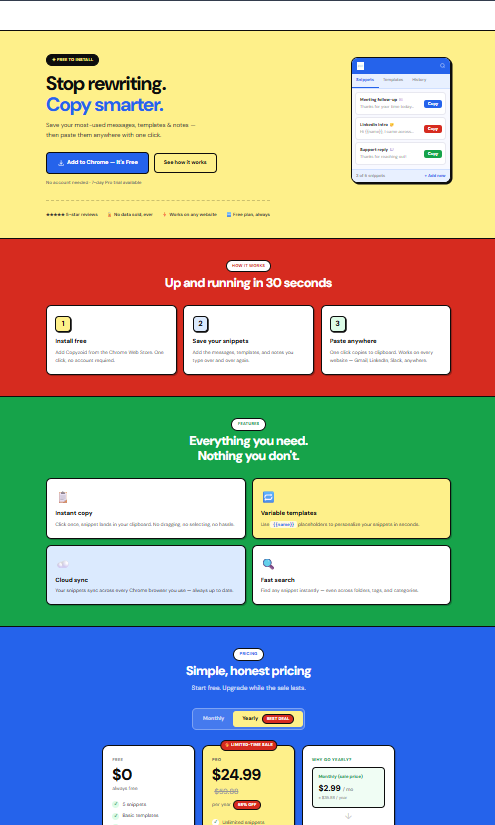
Using a tool like the Copyzoid clipboard manager for Chrome allows you to break your long, clunky templates into "micro-snippets." Instead of pasting a giant wall of text, you can quickly assemble a custom email using small, pre-verified blocks of text that keep things concise and relevant.
4. The "Choose Your Own Adventure" Call to Action
When you give people too many choices, they choose nothing. It’s called analysis paralysis.
The mistake: Your email ends with: "Check out our pricing, read this case study, and let me know if you want to chat next Tuesday at 2 PM or Wednesday at 10 AM."
How to fix it: Include no more than one or two CTAs.
- A "soft" CTA for people who are just browsing (e.g., a link to a helpful resource).
- A "hard" CTA for people ready to talk (e.g., a specific question about their schedule).
Make your request explicit and low-friction. "Are you free for a 5-minute sync?" is much easier to say yes to than "Can we schedule a formal demo?"
5. The Fatal Copy-Paste Fail
Nothing kills a deal faster than a formatting error that proves you’re using a template. We’ve all seen it: different font sizes in the same paragraph, or the classic "Hi {FIRSTNAME_PLACEHOLDER}."
The mistake: Relying on manual copy-pasting from a Google Doc or a messy Notepad file. This is where human error lives.
How to fix it: Stop the manual madness. You need a system that handles variables for you.
With Copyzoid, you don’t have to hunt for your templates. You hit Ctrl+B, search for your snippet, and it’s ready to go. You can set up templates with variables so you never accidentally leave a placeholder in your text again.
Visual: Minimalist geometric shapes (circles and lines) in Green and Yellow on a white background, symbolizing a clean, automated workflow without errors.
6. Sounding Like a Corporate Robot
If you wouldn't say it out loud to a human being at a coffee shop, don't put it in an email.
The mistake: Using "professional" jargon like "leveraging synergies," "disrupting the ecosystem," or "utilizing best-in-class solutions." It sounds fake, and prospects can smell the "sales-speak" from a mile away.
How to fix it: Adopt a conversational, slightly "unsure" tone. Use words like "perhaps," "think," or "wondering if."
Instead of: "I am reaching out to discuss how our solution can optimize your ROI."
Try: "I was looking at your site and wondered if you’ve had any trouble with [Problem]? I might have a way to help."
It feels like a real person sent it. It feels authentic.
7. Letting Your Templates Go Stale
The market changes. Your competitors change. Your product changes. If you’re still using the same outreach template you wrote six months ago, you’re essentially sending out "expired" messaging.
The mistake: Setting it and forgetting it.
How to fix it: You need to iterate. When a specific line or pitch starts underperforming, you need to be able to update it across your entire workflow instantly.
Because Copyzoid uses cloud sync, any update you make to a template on one machine is instantly available everywhere. If you find a new "hook" that’s working, you update the snippet once, and your whole team (or just your future self) has access to the latest, greatest version immediately.
Speed + Quality = More Wins
The secret to great sales outreach isn't just about working harder; it’s about working smarter. You want the speed of a template with the soul of a personal message.
When you eliminate the friction of finding, copying, and fixing your templates, you free up your brain to actually sell.
Why Copyzoid is your sales wingman:
- Instant Access: Stop digging through folders. Hit Ctrl+B and find what you need in a heartbeat.
- One-Click Simplicity: Click to copy. It’s that simple. No more messy formatting from Google Docs.
- Variable Support: Use placeholders that you actually remember to fill, keeping your personalization on point.
- Total Consistency: Keep your brand tone simple and effective across every single outreach attempt.
Don't let a bad template stand between you and your next closed deal. Fix these seven mistakes, clean up your workflow, and start hitting "Send" with confidence.

Visual: A bold, color-blocked geometric bird (the Copyzoid mascot style) composed of Blue, Red, Green, and Yellow shapes on a crisp white background, soaring upward to represent productivity.
Ready to stop wasting time on repetitive emails? Install Copyzoid for free and take control of your sales outreach today. Your inbox (and your commissions) will thank you.
Leave a Reply