
You are probably typing the same five sentences fifty times a day.
Whether it is "Thanks for reaching out, I’ll get back to you by EOD," or "Here is the link to my calendar for a quick sync," those seconds add up. For the average knowledge worker, repetitive messaging is an invisible time thief that drains focus and creates unnecessary friction.
Research shows that using simple automation for repetitive responses can reduce keystrokes by over 60%. That isn't just a minor tweak; it is hours of your life back every single week.
If you want to stop the manual grind and start working smarter, here are 7 quick hacks to eliminate repetitive typing for good.
1. Move Beyond "Copy and Paste"
Most people rely on a messy Word doc or a "Notes" app to store their templates. You have to tab away from your email, find the note, highlight the text, copy it, tab back, and paste it.
That is too many steps.
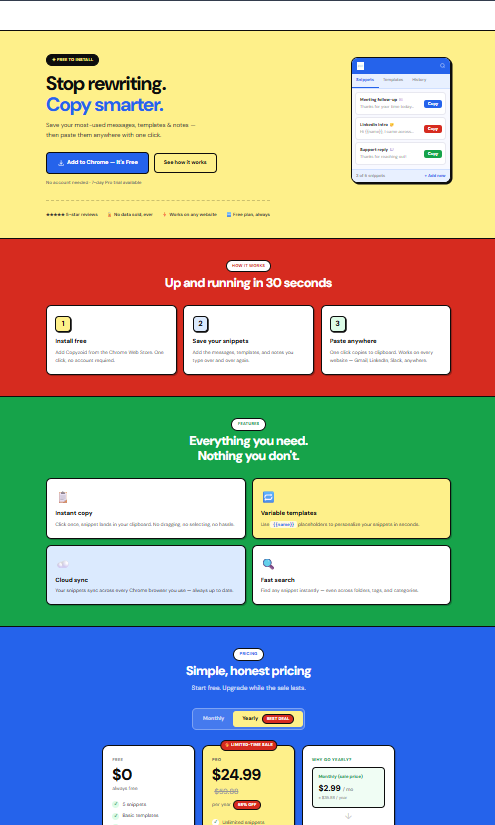
The first hack is to use a dedicated clipboard manager or text expander. Instead of hunting for text, you should be able to summon it instantly. Tools that live inside your browser, like the Copyzoid Chrome extension, allow you to keep your most-used snippets just one click away.
By keeping your "canned responses" in a dedicated sidebar, you eliminate the "context switching" that kills your flow.
Visual: A minimalist, geometric illustration on a white background showing a simple red square being moved into a blue circle, symbolizing the transition from messy notes to organized snippets.
2. Master the "Ctrl+B" Power Move
Speed is the name of the game. If you have to take your hands off the keyboard to reach for your mouse, you are losing momentum.
One of the most effective hacks for knowledge workers is mastering keyboard shortcuts. In Copyzoid, the Ctrl+B shortcut is your best friend.
Instead of searching through menus, you simply hit the shortcut, type a few letters of the snippet you need, and hit enter. It’s a "fuzzy search" system, meaning you don't even need to remember the exact name of your template.
- Ctrl+B to open your library.
- Type "intro" to find your outreach template.
- Enter to copy.
It’s fast, fluid, and keeps your hands exactly where they belong: on the keyboard.
3. Use Dynamic Variables (Don't Be a Robot)
The biggest fear people have with automated messages is looking like a robot. No one likes receiving an email that clearly feels like a "copy-paste" job.
The hack here is to use variables.
Instead of a static template like "Hi there," use a template with placeholders like "Hi {{Name}}." When you use a tool that supports variable templates, it forces you to customize the important parts while the repetitive "middle" of the message stays automated.
This allows you to maintain a personal touch in your sales outreach or customer support without having to re-type the standard parts of your pitch every single time.
4. The "One-Click" Library Rule
If a piece of information is requested more than three times a week, it deserves a spot in your permanent library.
Many workers make the mistake of only saving "big" templates, like full email drafts. However, the real time-savers are the small things:
- Your Zoom or Google Meet link.
- Your company’s tax ID or address.
- Standard pricing tiers.
- Commonly used hex codes or technical specs.
Create a "Small Snippets" category in your clipboard manager. When someone asks for your link, don't go to your calendar to find it. Just click it from your sidebar and move on.
5. Batch Your Communications
One of the biggest productivity killers is "reactive" messaging. Every time a notification pops up, you stop what you’re doing to type a reply.
Research suggests that context-switching fatigue can cut your productivity by 54%.
The hack? Batching.
Disable your notification sounds for everything except truly urgent contacts. Set specific times during the day: maybe 9 AM, 1 PM, and 4 PM: to handle all your repetitive messages at once.
When you are in "response mode," you can fly through your templates and snippets using your shortcuts. You’ll find that you can clear 20 emails in 10 minutes when you aren't being interrupted by new ones.

Visual: Minimalist geometric shapes (rectangles and triangles) in green and yellow, organized into neat vertical columns on a white background, representing blocked-out time and organized tasks.
6. Stop Organizing, Start Searching
People spend way too much time organizing their templates into complex folders and sub-folders.
"Is the refund template under 'Customer Support' or 'Finance'?"
Stop doing that. It’s a waste of time.
The modern hack is to rely on Fuzzy Search. This is a search method that finds what you need even if you don't type the full word or if you make a typo.
In Copyzoid, you don't need to know where a snippet is stored. You just hit the search bar and type "ref" and the "Refund Policy" snippet pops to the top. When you stop worrying about where things are and start trusting search, you save minutes on every interaction.
7. Sync Your Brain (and Your Devices)
You aren't always sitting at the same desk. Maybe you’re on your laptop at a coffee shop, or using your desktop in the office.
If your templates only live on one machine, you’ll end up re-typing them on the other. This creates "data silos" where you have different versions of the same message in different places.
The final hack is Cloud Sync.
Ensure your snippet library is synced across all your Chrome browsers. When you update a pricing template on your work computer, it should be ready to go on your personal laptop instantly. This ensures consistency in your communication: you’ll never send an "old" version of a message again.
Why This Matters for Knowledge Workers
Time is the only resource you can’t get more of.
If you spend 30 minutes a day typing repetitive messages, that is 2.5 hours a week or 10 hours a month. That is more than a full workday every month spent doing something a computer could do for you in seconds.
By implementing these 7 hacks, you aren't just "typing faster." You are protecting your mental energy. You are staying in the "zone" longer. And most importantly, you are freeing yourself up to do the work that actually requires your brain, rather than just your fingers.
Ready to get your time back?
Stop the "Copy-Paste" madness today. You can start building your library of snippets and mastering the Ctrl+B shortcut in less than two minutes.
Install Copyzoid for Chrome and see how much time you can save by never typing the same message twice.
Visual: A clean, minimalist graphic on a white background. A single blue line moving swiftly through a series of red and yellow geometric obstacles, representing speed and efficiency through automation.
Looking for more ways to boost your workflow? Check out our pricing page to see how our Pro features can help your entire team stay in sync.
Leave a Reply