
You are stuck in the 47-tab hunt.
Your browser is a graveyard of open documents, old emails, and Notion pages. You know you wrote the perfect response to this customer question last Tuesday, but you can’t find it.
So you click. You scroll. You toggle between your CRM and your sent folder.
This is the Toggle Tax.
Every time you switch contexts to find a piece of text, you lose momentum. Research shows that it takes about 23 minutes to get back into "the zone" after a distraction. When you spend your day hunting for snippets, you aren't actually working, you’re just managing your own inefficiency.
Canned responses are the antidote.
In this guide, we’ve put together 25 templates you can copy and paste right now. More importantly, we’ll show you how to stop the "hunt" forever using Copyzoid.
What are Canned Responses?
A canned response is a pre-written bit of text used to answer common questions or handle repetitive tasks.
Some people call them "snippets," "templates," or "macros." Whatever the name, the goal is the same: save time typing.
If you find yourself typing the same three sentences more than twice a day, those sentences should be a canned response. It’s not about being a robot; it’s about eliminating the friction of repetitive manual tasks so you can focus on the actual conversation.
10 Customer Support Canned Responses
Support teams live and die by their response times. Use these to keep your queue moving without losing the human touch.
1. The Standard Greeting
"Hi [Name]! Thanks for reaching out. I’d be happy to help you with [Issue]. Let me take a look at your account details."
2. Asking for More Context
"Thanks for the report, [Name]. To help me dig into this, could you let me know which browser you’re using and send over a quick screenshot of what you're seeing? This will help me reproduce the issue faster."
3. The Feature Request (Polite No)
"That’s a great suggestion! While we don't currently support [Feature], I’ve shared your feedback with our product team. We use customer input like this to decide what to build next."
4. Redirecting to Documentation
"I have just the resource for you! You can find a step-by-step guide on how to do that here: [Link]. If that doesn't clear things up, just let me know."
5. The "Wait in Queue" Message
"We’re currently seeing a high volume of requests, but we haven't forgotten about you! You’re currently [Number] in line. A member of our team will be with you shortly."
6. Politely Declining a Discount
"I understand you're looking for a better price. Currently, we don't offer additional discounts as we strive to keep our pricing fair and transparent for everyone. You can see our full pricing details here."
7. The Bug Fix Confirmation
"Great news, [Name]! Our engineering team just pushed a fix for the issue you reported. Could you refresh your page and let me know if it’s working on your end?"
8. Closing a Solved Ticket
"It looks like we’ve got everything squared away! I’ll go ahead and close this ticket, but if you need anything else, don't hesitate to reach out again. Have a great day!"
9. Asking for a Review
"I’m so glad I could help! If you have a spare 30 seconds, would you mind leaving us a quick review at [Link]? It really helps our team out."
10. The Proactive Follow-up
"Hi [Name], I'm just checking in to see if you had a chance to try [Solution]? Let me know if you’re still running into trouble!"

10 Sales Canned Responses
In sales, speed is a competitive advantage. If you can't reply to a lead within five minutes, your chances of closing drop significantly.
11. The Discovery Opener
"Hi [Name], thanks for your interest in [Product]! Just so I can give you the most relevant info, what are you currently using to solve [Problem]?"
12. The "Problem Validation"
"I hear that a lot from teams like yours. Usually, the goal is to reach [Objective] while avoiding [Pain Point]. Does that sound like what you're aiming for?"
13. The Post-Demo Follow-up
"Great speaking with you today! As promised, here are the slides we walked through and a link to start your [Free Trial]. What are the next steps on your end?"
14. Suggesting a Call (The Low Friction Ask)
"I think it might be easier to explain this over a quick 5-minute screen share. Do you have any time on Wednesday afternoon? Here is my calendar: [Link]."
15. The Upsell (Related Product)
"Since you're using [Feature A], I thought you might like to know that many of our users pair it with [Feature B] to automate their entire workflow. Want to see how it works?"
16. The Annual Plan Pitch
"I noticed you’re on the monthly plan. If you switch to the annual option, you’ll actually save 20% over the year. You can update your plan here whenever you're ready."
17. The "Gentle Breakup" Email
"I haven't heard back from you regarding [Project], so I’m going to assume your priorities have shifted. I’ll stop checking in for now, but feel free to reach out if you want to pick this back up later."
18. Handling a Competitor Comparison
"That’s a fair question! While [Competitor] is great for [Generic Task], our users usually choose us because of our [Unique Selling Point]. Would you like to see a comparison?"
19. The Referral Request
"It’s been a pleasure working with you! Do you know anyone else in your network who is struggling with [Problem] and might benefit from [Product]?"
20. The "New Feature" Reactivation
"Hi [Name], I remember you mentioned needing [Feature] a few months ago. We just launched it! Would you like a quick walkthrough of how it works?"
5 Recruiting Canned Responses
Recruiters deal with massive volumes of repetitive outreach. These templates help you stay organized and professional.
21. Application Received
"Hi [Name], thanks for applying for the [Role] position! We’ve received your application and our team is currently reviewing it. We’ll be in touch within [Number] days."
22. The Interview Invite
"We were really impressed with your background and would love to chat! Do you have 30 minutes available this week for a brief Zoom call? You can grab a slot here: [Link]."
23. The Post-Interview Rejection
"Thank you for taking the time to meet with us, [Name]. While we enjoyed learning about your experience, we’ve decided to move forward with another candidate at this time. We wish you the best in your search!"
24. The Job Offer (Initial)
"Exciting news! We’d like to officially offer you the position of [Role] at [Company]. We think you’ll be a fantastic fit for the team. Check your email for the full offer letter and details."
25. The Follow-up on an Unsigned Offer
"Hi [Name], just checking in to see if you had any questions about the offer letter we sent over on Tuesday? We’re excited to get you started!"
How to Stop the "47-Tab Hunt" with Copyzoid
Having a list of canned responses is only half the battle. If those responses are buried in a Google Doc or a "Sent" folder, you are still paying the Toggle Tax.
You are still hunting.
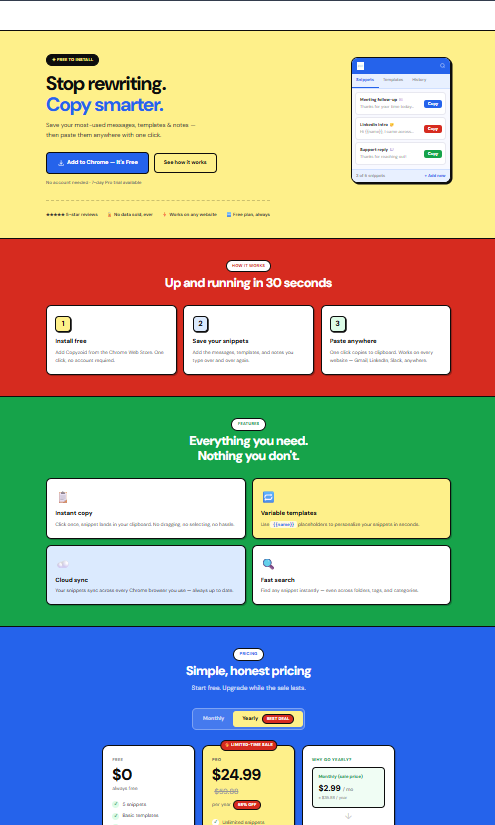
Copyzoid is a Chrome extension designed to eliminate the hunt. Instead of switching tabs, you use a simple keyboard shortcut: Ctrl+B.
Here is how it changes your workflow:
- Instant Access: Press Ctrl+B anywhere in your browser. A search bar appears instantly.
- Fuzzy Search: You don't need to remember the exact name of your snippet. Type "greet" or "refund" and Copyzoid finds the right canned response in milliseconds.
- One-Click Copy: Click the snippet, and it's on your clipboard. Paste it and move on.
- Smart Variables: Stop manually changing "[Name]" in every email. Copyzoid lets you use variables so your snippets are personalized but ready to go in a single click.

Why Snippets Beat Manual Typing
Every time you type "Thanks for reaching out, I'd be happy to help," you are wasting about 10 seconds. If you do that 50 times a day, that's nearly an hour a week.
Over a year, that's an entire work week spent typing the same 10 words.
By using canned responses with a tool like Copyzoid, you reclaim that time. You eliminate the mental fatigue of trying to remember the "perfect" way you phrased something in the past.
Get Started Today
Don't let the Toggle Tax drain your productivity. Start building your library of canned responses today.
You can start for free by installing the Copyzoid Chrome extension. Save these 25 examples into your dashboard, assign them tags, and use Ctrl+B to find them the next time you're about to start the "47-tab hunt."
Your brain (and your inbox) will thank you. 🚀
Leave a Reply