
You are losing hours every single week to your inbox.
If you are a sales professional, you know the feeling of staring at a blank "New Message" window. You know the frustration of digging through your "Sent" folder to find that one perfect reply you wrote three weeks ago.
Copying and pasting is slow. Retyping from memory is even slower.
The secret to high-performing sales teams isn't that they write better emails in the moment. It's that they never write the same email twice. They use a library of proven scripts that they can deploy in seconds.
In this guide, we’re giving you the 5 essential sales scripts you need to fill your pipeline and close deals. We’ll also show you how to use Copyzoid to trigger these templates instantly using Ctrl+B, so you never have to hunt for a draft again.
Why Your Current Email Workflow is Costing You Money
Most sales reps treat every email like a unique piece of art. It’s a waste of time.
When you manually type out every outreach message or follow-up, you introduce room for error. You forget to include key links. You make typos. Most importantly, you lose the momentum required to hit your daily activity targets.
Efficiency in sales is a numbers game. If you can send 50 high-quality, personalized emails in the time it takes your competitor to send 10, you win.
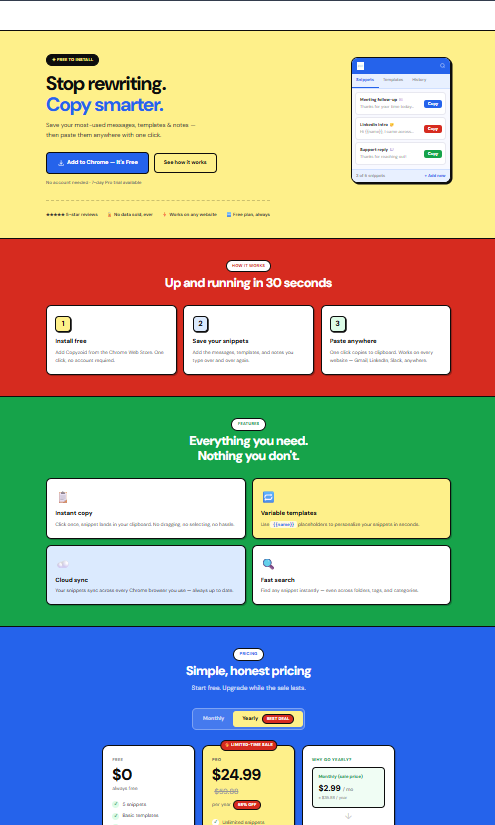
Using a clipboard manager for Chrome allows you to turn these scripts into instant snippets. Instead of a messy Word document, you have a searchable database available with one click.
1. The Connection Builder (Cold Outreach)
The goal of your first email shouldn't be to sell your product. It should be to start a conversation.
Most cold emails fail because they ask for too much too soon. You wouldn’t ask someone to marry you on a first date. Don't ask for a 30-minute demo in the first email.
The Connection Builder focuses on a "low-commitment" ask. It uses the word "quick" to lower the prospect's guard.
The Template:
Subject: Quick question regarding {{Company_Name}}
Body:
Hi {{First_Name}},
I’ve been following {{Company_Name}}’s recent work in {{Industry}}, specifically your latest move with {{Recent_News}}.
I wanted to reach out because we’ve helped similar teams solve {{Common_Pain_Point}}.
Do you have a quick 2 minutes to exchange a few thoughts on how you’re currently handling {{Task}}?
Best,
{{Your_Name}}
Why it works:
- Personalization: It mentions their specific company and news.
- Low Friction: You aren't asking for a meeting; you're asking for "thoughts."
- Brevity: It’s short enough to read on a mobile lock screen.
2. The Value Proposition (The "Problem Solver")
Once you’ve identified a prospect who has a clear need, you need to hit them with the Value Proposition.
This script is direct. It identifies a pain point, offers a solution, and paints a picture of a better future.
The Template:
Subject: Imagine solving {{Pain_Point}} by next week
Body:
Hi {{First_Name}},
Most {{Job_Title}}s I talk to tell me that {{Pain_Point}} is their biggest bottleneck. It’s frustrating, expensive, and slows down growth.
We built Copyzoid to eliminate that.
By using our tool, teams are able to:
- Save 5+ hours a week on repetitive typing.
- Eliminate errors in outbound messaging.
- Sync templates across the entire team instantly.
Are you open to a brief chat to see if we can do the same for {{Company_Name}}?
Best,
{{Your_Name}}
Pro Tip:
Use variables in your snippets. In Copyzoid, you can save this template and leave placeholders like {{Pain_Point}} so you can fill them in instantly before hitting send.

3. The Social Proof Template (The Credibility Booster)
People don't want to be the first person to try a new tool. They want to know that people they respect are already using it successfully.
This template leverages social proof to build trust quickly.
The Template:
Subject: How {{Competitor_or_Peer}} increased output by {{Percentage}}%
Body:
Hi {{First_Name}},
I thought you might find this interesting. We recently worked with {{Client_Name}} to help them streamline their {{Process}}.
By implementing a few simple changes to their workflow, they saw a {{Result}} in just 30 days.
I’d love to share the specific framework we used with them and see if it’s applicable to your team at {{Company_Name}}.
Do you have 10 minutes on Thursday?
Best,
{{Your_Name}}
Why it works:
- FOMO (Fear Of Missing Out): It suggests their competitors might have an edge they don't.
- Concrete Data: Using specific percentages or timeframes makes the claim believable.
4. The Strategic Follow-Up
The fortune is in the follow-up. Most sales are made between the 5th and 12th contact.
However, most reps send boring "Just checking in" emails. Those get deleted. A Strategic Follow-Up adds value or references a previous conversation to keep the spark alive.
The Template:
Subject: Thinking about our conversation on {{Topic}}
Body:
Hi {{First_Name}},
I came across this article on {{Industry_Trend}} and immediately thought of our conversation regarding {{Project}}.
I remember you mentioned that {{Specific_Challenge}} was a priority for you this quarter.
If you’re still looking for a way to streamline that, I’d love to pick up where we left off.
Does Tuesday at 10 AM work for a quick sync?
Best,
{{Your_Name}}

5. The Bottom Line (The Direct Pitch)
Sometimes, you just need to get to the point. If a prospect has shown interest or is a perfect fit, don't beat around the bush.
The Bottom Line script is for those high-intent moments where you want to close the deal or get a definitive "yes" or "no."
The Template:
Subject: Ready to start with {{Product_Name}}?
Body:
Hi {{First_Name}},
Based on our previous chats, it’s clear that {{Company_Name}} is ready to scale {{Department}}.
Here is what we can do for you:
- Immediate Setup: We get your team onboarded in under 5 minutes.
- Custom Templates: We’ll help you migrate your current scripts into Copyzoid.
- ROI: You’ll see time savings on day one.
You can view our full feature list and pricing here.
Should I send over the agreement, or do you have one last question for me?
Best,
{{Your_Name}}
How to Manage These Scripts Without Losing Your Mind
Having great scripts is only half the battle. The real challenge is accessibility.
If you have to open a "Sales_Templates_v2_FINAL.docx" file every time you want to send an email, you aren't being productive. You’re just creating a different kind of friction.
This is where Copyzoid changes the game.
Step 1: Save Your Snippets
Take the five templates above and save them as snippets in your Copyzoid dashboard. Use descriptive titles so you can find them instantly using the fast fuzzy search.
Step 2: Use One-Click Copy
When you're in Gmail, Outlook, or your CRM (like Salesforce or HubSpot), you don't need to leave the tab. Just open the Copyzoid extension.
Step 3: The Ctrl+B Power Move
The fastest way to work is to use the Ctrl+B (or Cmd+B on Mac) shortcut. This opens your snippet library immediately. You can search for "Follow-up," hit Enter, and the text is ready to be pasted.
No more searching. No more repetitive typing. Just pure execution.
Best Practices for Sales Email Success
To make these templates truly effective, follow these simple rules:
- Keep Subject Lines Short: Aim for under 50 characters. Subject lines like "Quick question" or "Feedback on {{Project}}" often have the highest open rates.
- One Call to Action (CTA): Don't ask them to visit your website, watch a video, AND book a meeting. Pick one goal and stick to it.
- Mobile Optimization: Most people read emails on their phones. Keep your paragraphs to 1 or 2 sentences max. If it looks like a wall of text, it won't be read.
- Be Human: Even though you are using a template, spend 30 seconds personalizing the first sentence. It makes a massive difference in response rates.

Conclusion: Stop Typing, Start Closing
The most successful sales professionals are the ones who master their tools. They don't work harder; they work smarter.
By using these 5 essential scripts and organizing them within Copyzoid, you eliminate the "blank page" syndrome. You ensure that every piece of outreach you send is polished, professional, and proven to work.
Stop wasting time on the manual labor of sales. Save your scripts, use Ctrl+B, and get back to closing deals.
Ready to streamline your workflow? Check out our pricing and start saving hours today. 🚀
Leave a Reply