
You know the feeling. You sent an important email three days ago, and the silence is deafening.
You need to follow up, but you don't want to be "that person." You don't want to sound desperate, annoying, or pushy. So, instead of hitting send, you spend twenty minutes staring at a blank draft, wondering if "Just checking in" is too cliché.
This mental loop is part of the mental load that kills productivity.
Even worse is the 47-tab hunt. You remember you wrote a great follow-up two months ago. Now you’re digging through your "Sent" folder, switching between tabs, losing focus, and paying the Toggle Tax.
The Toggle Tax is the price you pay in lost time and brainpower every time you switch contexts. Research shows it takes over 20 minutes to get back into a deep flow state after a distraction.
We’re going to fix that. Here are 12 follow-up email templates designed to get replies without the "pushy" vibe, and a way to send them without the tab-hunting nightmare.
Why Most Follow-Ups Fail
Most people fail at following up because they make the email about themselves.
"I wanted to see if you saw my email."
"I'm following up on my proposal."
These are "me-centric." To get a reply, you need to be concise, polite, and value-driven. You need to make it easy for the recipient to say "yes" or provide an update.
The Rules of the Non-Pushy Follow-Up
- Keep it under 125 words. Short emails get higher reply rates.
- Wait 3–5 days. Don't be a stalker, but don't wait two weeks.
- Have a clear CTA. Tell them exactly what the next step is.
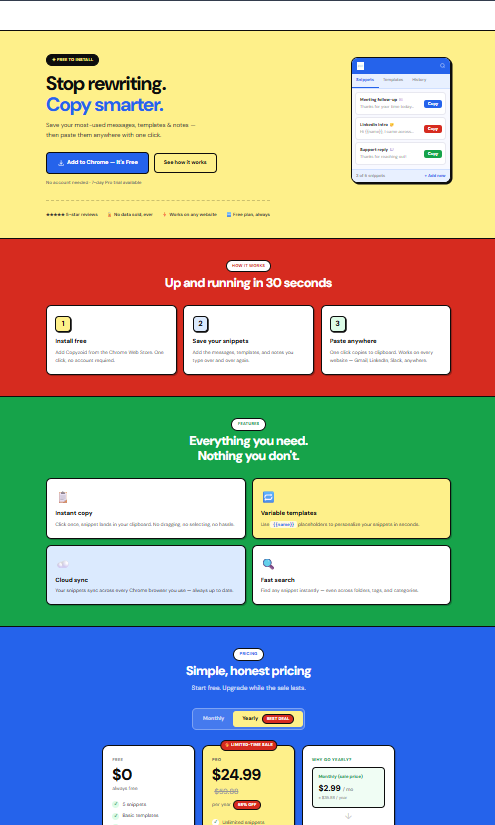
- Stop hunting for drafts. Use a tool like Copyzoid to keep these templates one click away.
12 Follow-Up Templates for Every Scenario
1. The "Low-Pressure" Check-In
Best for when you just need a quick status update on a project or proposal.
Subject: Quick check-in: [Project Name]
Hi [Name],
I’m sure you’ve had a busy week! I just wanted to see if you had any thoughts on the [Document/Proposal] I sent over on Tuesday.
No rush at all, just let me know if you need any clarification on the details.
Best,
[Your Name]
2. The Meeting Recap (Immediate Follow-Up)
Always send this within 24 hours of a call. It establishes you as organized.
Subject: Great chatting today / Next steps
Hi [Name],
Thanks for the time today! I really enjoyed our conversation about [Specific Topic].
To keep things moving, here’s a quick recap of our next steps:
- [Action Item 1]
- [Action Item 2]
I’ll follow up again once [Task] is complete.
Cheers,
[Your Name]
3. The "Value-Add" Sales Follow-Up
Instead of asking for a check, give them something useful.
Subject: Thought you’d find this interesting
Hi [Name],
I saw this [Article/Case Study] about [Industry Challenge] and immediately thought of our conversation.
Given what you mentioned about [Pain Point], I think page 3 might be particularly relevant to your team.
Hope it helps!
[Your Name]
4. The Post-Interview Silence
When you haven't heard back after a job interview.
Subject: Following up: [Job Title] Role
Hi [Name],
I hope you’re having a great week.
I’m checking in on the status of the [Job Title] position. I’m still very excited about the possibility of joining the team at [Company].
Please let me know if there’s any additional information I can provide to help with the decision process.
Best regards,
[Your Name]
5. The "Social Proof" Angle
If they’re on the fence, show them someone else who succeeded.
Subject: How [Similar Company] solved [Problem]
Hi [Name],
I know you’re evaluating [Service/Product]. I thought you might like to see how [Client Name] handled a similar challenge recently.
They were able to [Specific Result] in just [Timeframe].
Happy to chat about how we could replicate this for you if you have 5 minutes next week.
[Your Name]
6. The "Missing Piece" Follow-Up
When you need a document or a signature to move forward.
Subject: Quick question regarding [Document Name]
Hi [Name],
I’m almost ready to jump on [Project], but I realized I’m still missing the [Specific Document].
Could you send that over when you have a moment? Once I have it, I can get started immediately.
Thanks!
[Your Name]
7. The Networking/Event Follow-Up
Sent after meeting someone at a conference or mixer.
Subject: Great meeting you at [Event Name]!
Hi [Name],
It was a pleasure meeting you at [Event] yesterday. I really liked your take on [Topic discussed].
I’d love to stay in touch. Are you open to a brief coffee chat (virtual or in-person) sometime in the next few weeks?
Best,
[Your Name]
8. The "Gentle Bump" (Ultra-Short)
Sometimes, the best email is the one that takes 3 seconds to read.
Subject: Re: [Original Subject]
Hi [Name],
Just bringing this to the top of your inbox in case it got buried!
Best,
[Your Name]
9. The Referral Follow-Up
When a mutual friend introduced you, but the contact hasn't replied.
Subject: Following up (via [Referral Name])
Hi [Name],
[Referral Name] suggested I reach out to you regarding [Topic].
I’m sure your schedule is packed, but I’d love to connect for 10 minutes to see if my work at [Company] aligns with your current goals.
Talk soon,
[Your Name]
10. The "I'm Here to Help"
Best for service providers checking in on a past client.
Subject: Checking in / [Project Name]
Hi [Name],
It’s been a few months since we finished [Project]. How are things holding up?
If you have any new questions or need a quick tweak on anything we built, just let me know. Always happy to help.
Best,
[Your Name]
11. The "Congratulatory" Follow-Up
Build the relationship without asking for anything.
Subject: Congrats on [Achievement]!
Hi [Name],
I just saw the news about [Company Milestone/Promotion]. Huge congratulations!
It’s great to see all your hard work paying off. Hope you have a chance to celebrate this week.
Cheers,
[Your Name]
12. The "Break-Up" Email (The Last Attempt)
When you’ve followed up 3-4 times with no response. This often triggers a "guilt" reply.
Subject: Should I cross this off my list?
Hi [Name],
I haven’t heard back regarding [Project/Proposal], so I’m assuming priorities have shifted on your end.
I’ll go ahead and take this off my active follow-up list for now. If you decide to revisit this in the future, feel free to reach out!
Best,
[Your Name]
Stop the "47-Tab Hunt" and Eliminate the Toggle Tax
Having these templates is only half the battle. If you have to dig through a Word doc or search your "Sent" folder every time you want to use one, you’re still losing time.
This is where the Toggle Tax hits the hardest. Every time you leave your inbox to find a template, your brain loses momentum.
Copyzoid was built to stop this.
Instead of hunting, you just press Ctrl+B. A clean window pops up with all your snippets and templates. You find the one you need with a fast fuzzy search, and it’s copied to your clipboard instantly.
One click. No tabs. No hunting.
Why Knowledge Workers Use Copyzoid for Follow-Ups:
- Instant Access: Stop searching through "Sent" folders. Hit Ctrl+B and you're done.
- Smart Variables: Save your templates with placeholders like
{Name}or{Project}so you never accidentally send an email with the wrong person's name. - Reduce Mental Load: When the "how do I say this?" part is already solved, you’re more likely to actually send the follow-up.
- Zero Distraction: You stay inside your browser, in your flow, without opening 47 tabs to find a single paragraph.
Setting Up Your Follow-Up Machine
- Install the Extension: Get Copyzoid for Chrome.
- Save Your Snippets: Copy the 12 templates above and save them as snippets in your Copyzoid dashboard.
- Use Tags: Tag them with "Sales," "Networking," or "Follow-up" to find them in milliseconds.
- Send Faster: Next time you’re in Gmail or Outlook, just hit Ctrl+B, type "Breakup," and paste.
Following up doesn't have to be a high-stress, time-consuming task. It’s just a process. By using proven templates and a tool that eliminates the Toggle Tax, you can reclaim hours of your week and keep your projects moving forward.
Ready to stop the 47-tab hunt? Check out our pricing and start sending better follow-ups today. 🚀
For more tips on speeding up your workflow, check out our guide on how to save time typing.
Leave a Reply