You are probably losing over four hours a week to the Toggle Tax.
In 2026, productivity isn’t about working harder; it’s about stopping the tab-switching madness. We’ve all been there: you’re in the middle of a high-focus task, but you need one specific link, one snippet of text, or one piece of data.
Suddenly, you’re on the 47-tab hunt.
You click through three different windows, get distracted by a notification, and by the time you find what you need, your flow state is gone. This "Toggle Tax" is the hidden friction that kills your momentum.
If you want to reclaim your time this year, you need a lean, mean browser setup. Here is the definitive shortlist of the best chrome extensions for productivity designed for the modern knowledge worker.
The Cost of the 47-Tab Hunt
Before we dive into the tools, we have to talk about why your browser is currently a productivity graveyard.
Most knowledge workers keep dozens of tabs open as a "visual to-do list." But every open tab is a tiny pull on your attention. In 2026, the most successful professionals are moving toward minimalist browsing.
The goal is simple: Stay in one place.
The less you have to leave your active tab to find information, the faster you get things done. That is where these extensions come in. They bring the information to you, rather than making you hunt for it.
1. Copyzoid: The End of Repetitive Typing
If you find yourself typing the same emails, URLs, or answers over and over, you are wasting hours.
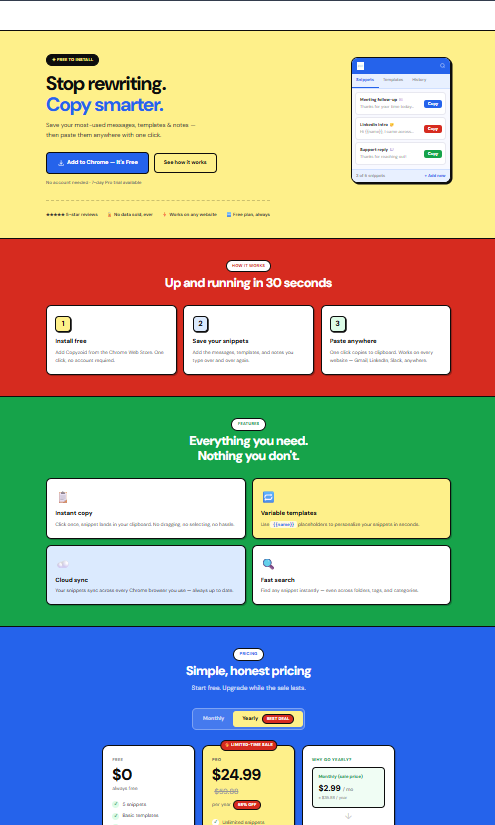
Copyzoid is designed to eliminate the need to hunt through old "Sent" folders or Google Docs for that one specific bio or link. It is a clipboard manager for Chrome that focuses on speed and functional efficiency.
Why it’s on the list:
- Ctrl+B Shortcut: You can access your entire library of snippets instantly without taking your hands off the keyboard.
- One-Click Copy: See a snippet you need? One click puts it on your clipboard.
- Variable Templates: You can create templates that ask for a name or date, making "personalized" outreach take seconds rather than minutes.
- Cloud Sync: Your snippets follow you from your work laptop to your home desktop.
Instead of the 47-tab hunt, you hit a shortcut, grab your text, and keep moving. It is the ultimate tool to save time typing.
2. Perplexity AI: The Research Shortcut
Google is great, but scrolling through ten blue links and three ads to find a specific fact is a massive time-sink.
Perplexity AI’s Chrome extension changes how you find information. Instead of opening new tabs for every question, you can ask the extension directly.
Why it’s on the list:
- Instant Summaries: It reads the page you are on and summarizes the key points.
- Source Citation: Unlike some AI tools that hallucinate, Perplexity gives you the links to back up its claims.
- Contextual Awareness: You can ask questions specifically about the article you are currently reading.
This eliminates the need to "hunt" for data points across multiple sources. You get the answer, and you stay focused on your primary task.
3. Cold Turkey Blocker: Reclaiming Focus
The biggest enemy of productivity in 2026 is the "quick check" of social media that turns into a 20-minute scroll.
Cold Turkey is the most aggressive (and effective) distraction blocker available. While other extensions are easy to bypass, Cold Turkey is built to stay on.

Why it’s on the list:
- Hard Locking: You can set a timer that you literally cannot turn off until the time is up.
- Schedule Blocks: Automatically block distracting sites during your peak work hours (e.g., 9:00 AM to 12:00 PM).
- Custom Lists: Block entire categories of sites or just the specific ones that tempt you most.
If you struggle with the "urge" to toggle away from your work, this extension forces you to stay put. It’s the digital equivalent of locking your phone in another room.
4. Raindrop.io: The Visual Brain
Bookmarks in Chrome haven't changed much in a decade. They are usually a messy list where links go to die.
Raindrop.io turns your bookmarks into a highly organized, searchable library. It is perfect for knowledge workers who need to reference research, design inspiration, or technical documentation frequently.
Why it’s on the list:
- Visual Organization: Use tags, folders, and icons to make finding links intuitive.
- Searchable Content: It doesn't just search the title of the bookmark; it can search the content of the page you saved.
- Clean UI: It replaces the clunky Chrome bookmark manager with something that actually looks good.
Stop the 47-tab hunt by saving your research properly. If you know exactly where a resource is, you won't feel the need to keep it open "just in case."
5. Momentum: The Mental Reset
Every time you open a new tab, you are at a crossroads. You can either go to the site you need or get distracted by a bookmark or a news feed.
Momentum replaces the "New Tab" page with a beautiful, minimalist dashboard that reminds you of your main goal for the day.
Why it’s on the list:
- Daily Focus: It asks, "What is your main focus for today?" and keeps that front and center every time you open a tab.
- Minimalist Design: Beautiful photography and a simple clock keep you calm rather than cluttered.
- To-Do Integration: A small, non-intrusive to-do list in the corner helps you track sub-tasks.
It serves as a gentle "speed bump" that prevents mindless browsing. It reminds you why you opened the browser in the first place.
6. Scribe: Instant Documentation
If your job involves explaining how to do things to clients or teammates, Scribe will save you hours of manual work.
Instead of taking screenshots and typing out "Click here, then click there," Scribe watches you work and builds the guide for you.
Why it’s on the list:
- Auto-Capture: It records your clicks and keystrokes to generate step-by-step instructions automatically.
- Easy Sharing: You can send a link to a guide in seconds.
- Visual Clarity: It highlights exactly where the user needs to click on the screen.
This is a massive win for reducing the Toggle Tax. You don't have to switch back and forth between a screen recorder and a Word doc. You just do the work, and the documentation is finished.
7. Grammarly: Communication Insurance
Writing is the core of knowledge work. Whether it’s an email, a Slack message, or a proposal, your clarity is your professional reputation.
Grammarly has evolved beyond a simple spell-checker into an AI-powered communication assistant that works across almost every site.
Why it’s on the list:
- Tone Detection: It tells you if you sound too aggressive, too timid, or just right.
- Clarity Suggestions: It helps you cut the fluff and get to the point.
- Cross-Platform: It works in Gmail, LinkedIn, and your browser-based CRM.
By getting your writing right the first time, you avoid the "back-and-forth" emails that clutter your inbox and your brain.
How to Build Your 2026 Productivity Stack
You don't need fifty extensions. In fact, having too many will slow down your browser and increase your cognitive load.
The secret is to pick one tool for each "pain point" in your workflow:
- For Communication: Use Copyzoid to handle your snippets and repetitive text. It's the fastest way to respond to people without losing your mind.
- For Information: Use Perplexity to find answers and Raindrop to store them.
- For Focus: Use Cold Turkey to block the noise and Momentum to keep your goal in sight.
Why "Simple" Wins in 2026
The best chrome extensions for productivity have one thing in common: they stay out of your way.
The Toggle Tax is expensive because it breaks your focus. Every time a tool makes you navigate a complex menu or open a new window, it’s failing you.
That is why we built Copyzoid to be keyboard-first. When you use Ctrl+B, you aren't "switching" tasks. You are just pulling a resource into your current task. It’s the difference between walking to a filing cabinet in another room and having a toolbelt on your hip.
Ready to stop the hunt?
If you are tired of the 47-tab hunt and ready to reclaim those lost hours, start with a tool that solves the most frequent problem: repetitive typing.
You can check out our simple pricing to see how easy it is to get your whole team on the same page.
In 2026, the winners aren't the people with the most tabs open. They are the people who have the right tools to stay in the zone.
Stop the toggle. Start the work.
Leave a Reply