

You spend twenty minutes refining a prompt to refactor a messy React component into clean, functional hooks. It works perfectly. Three days later, you need to do the exact same thing for a different module. You open your AI chat history, scroll through dozens of "Hey," "Fix this error," and "What is the meaning of life?" threads, but you can’t find it.
This is the hidden tax on developer productivity.
Losing your best AI prompts is like losing your favorite custom shell scripts. You know they exist somewhere, but the time spent searching for them often exceeds the time it takes to just write them from scratch again.
If you are a developer, your "prompt engineering" is actually just a new form of documentation. It deserves a better home than a disappearing browser tab or a buried Slack message.
The Problem with Scattering Your Prompts
Most developers lose their best prompts daily because they treat them as disposable. They scatter them across browser tabs, notes apps, and IDE scratch files.
The conventional approach to saving prompts fails at scale. Without a centralized system, you end up rewriting prompts that almost work instead of retrieving the ones that are proven to deliver.
This creates three major issues:
- Inconsistency: The AI gives you different results every time because your input varies slightly.
- Context Loss: You forget the specific constraints (like "don't use external libraries" or "use TypeScript 5.0 syntax") that made the original output good.
- Time Waste: You are effectively re-inventing the wheel once or twice a week.

The "Big Three" Prompts Every Developer Should Save
To stay efficient, you need a prompt manager that acts as a second brain for your technical workflows. Here are the three types of prompts that provide the highest return on investment when saved and reused.
1. Complex Regex Generation
Nobody actually enjoys writing Regex from scratch. We usually ask an AI to do it. However, a prompt like "Write a Regex for email" is too vague. A good prompt: the kind worth saving: includes edge cases, negative lookaheads, and specific language flavors (like JavaScript vs. Python).
Once you have a prompt that successfully handles a tricky validation scenario, save it. Next time you need a similar pattern, you don't have to remember how you phrased the request. You just hit Ctrl+B, find your "Regex Master" snippet, and swap out the specific requirements.
2. "Explain This Legacy Code" Templates
We’ve all inherited a codebase that looks like it was written by a caffeinated squirrel. Using AI to summarize legacy logic is a massive timesaver.
But for the AI to be helpful, it needs context. A saved template like: "Act as a Senior Backend Engineer. Explain the following legacy function, identify potential side effects, and list the external dependencies. Use a bulleted list for the summary" ensures you get the same high-quality explanation every time you encounter a mysterious block of code.
3. Boilerplate and Configuration
Setting up a new Vite project, configuring Tailwind, or writing a Dockerfile for a specific microservice often involves the same repetitive steps.
Instead of searching through old GitHub repos, keep your "Ultimate Docker Config" prompt in a dedicated tool. This allows you to generate fresh, up-to-date configuration files in seconds without leaving your browser.
Why General Notes Apps Fail Developers
You might think, "I'll just put my prompts in a Notion page or a Google Doc."
That is better than nothing, but it’s still slow. To use a prompt from a notes app, you have to:
- Switch windows.
- Find the right page.
- Search for the text.
- Copy it.
- Switch back to your AI tool.
- Paste it.
This breaks your flow state. Developer productivity relies on staying in the zone. Every time you switch windows to find a snippet, you risk getting distracted by a notification or a random browser tab.
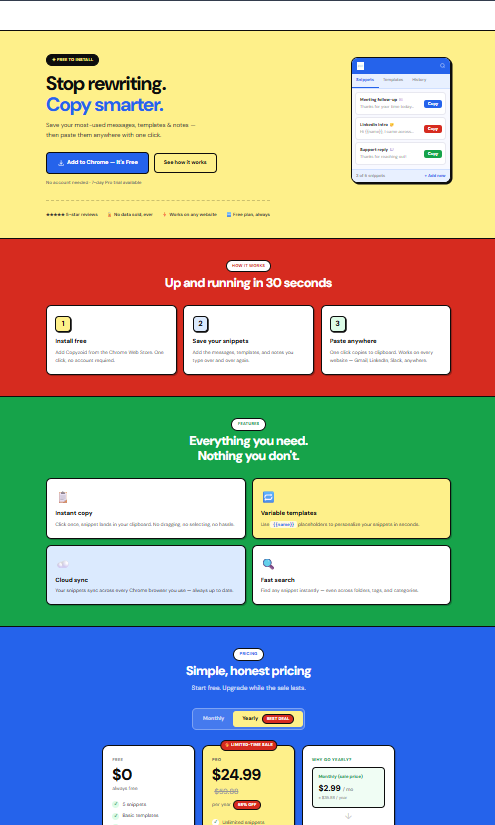
A better solution is a dedicated browser extension like Copyzoid. Because Copyzoid lives in your browser, your prompts are always one click away from your AI chat box.
How to Build a Prompt Library That Actually Works
Don't just save everything. That leads to a cluttered library that is just as hard to search as your chat history. Follow these three rules to keep your code snippets and prompts organized:
Use Variables
Instead of saving "Write a Python script to scrape xyz.com," save a template: "Write a Python script to scrape {{URL}} using BeautifulSoup, handling pagination and rate limiting."
This makes the prompt reusable for any site. When you need it, you just fill in the variable and go.
Use Tags
Tag your prompts by language or task. Examples include #refactor, #regex, #documentation, or #sql. This makes it much easier to use a fuzzy search to find what you need in seconds.
Meta-Prompting
Use the AI to improve your prompts before you save them. Ask the AI: "I want to save this prompt for future use. How can I make it more precise and effective for a LLM?" Once the AI refines it, save that version.

The Copyzoid Advantage: Speed and Sync
If you are looking for a way to manage these assets, Copyzoid is built for speed. It's a simple, minimalist tool that doesn't get in your way.
Here is why it works for developers:
- Ctrl+B Shortcut: This is the core of the experience. You don't have to click around. Just hit the shortcut and start typing.
- One-Click Copy: Once you find the prompt or code snippet you need, one click (or the Enter key) puts it on your clipboard.
- Cloud Sync: Your prompts shouldn't live on just one machine. Whether you are at your office workstation or on your laptop at a coffee shop, your library stays with you.
- Fuzzy Search: You don't need to remember the exact name of your snippet. Just type "reg" and your Regex prompts will appear instantly.
Elevating Your Workflow
Prompting is a skill, and like any skill, it requires the right tools to master. By treating your prompts as valuable code snippets, you eliminate the "blank page" syndrome that happens when you're staring at a chat box trying to remember how you solved a problem last month.
Stop letting your best ideas disappear into the void of your browser history. Start building a library that makes you faster every single day. 📝
If you're ready to organize your workflow and stop wasting time on repetitive typing, check out our pricing page to see how you can get started for free.
Summary: How to Start Today
- Identify your repeats: What have you asked an AI three times this week?
- Refine the prompt: Make it generic and add variables where necessary.
- Centralize: Use a tool like Copyzoid to save it.
- Deploy: Use Ctrl+B next time the task comes up.
Efficiency isn't about working harder; it's about working smarter. By managing your prompts, you are giving yourself more time to focus on what actually matters: building great software. 🚀
Leave a Reply