
You are likely losing hours every single week to the "Toggle Tax."
It’s that invisible cost of switching between forty-seven different browser tabs just to find that one specific email reply or outreach template you wrote three months ago.
Snippet managers are supposed to solve this. They are built to kill the "copy-paste chaos" and give you back your focus.
But here’s the problem: most people use their snippet manager in a way that actually adds more friction to their day.
If your snippet tool feels like a chore rather than a superpower, you’re likely making one of these seven common mistakes.
Here is how to fix them and get back to actual work.
1. Creating the "Everything Drawer"
The most common mistake is treating your snippet manager like a junk drawer.
You find a cool piece of text, you save it, and you give it a vague name like "Response 1" or "Note." Six months later, you have 400 snippets and no idea where anything is.
When your snippets aren’t organized, you spend more time searching for the template than it would take to just type it from scratch. This defeats the entire purpose of a productivity tool.
The Fix: Use Simple Folders.
Don't overthink it. You don't need a complex hierarchy. In Copyzoid, we focus on simple folders that mirror your actual workflow.
Create a folder for "Sales Outreach," one for "Support FAQ," and perhaps one for "Personal Links."
If you can’t find a snippet in under three seconds, your organization is too complex, or non-existent.
2. Writing "Novels" Instead of Snippets
A snippet should be a surgical strike, not a chapter from a book.
Many users try to save entire five-paragraph emails as a single snippet. While this works occasionally, it often lacks the flexibility needed for real-world conversations.
If you have to spend two minutes deleting half of a snippet every time you paste it, it’s not a snippet. It’s a burden.
The Fix: The Modular Approach.
Break your long templates into smaller, modular pieces.
Instead of one giant "Onboarding Email," try having:
- A "Greeting" snippet.
- A "Value Prop" snippet.
- A "Next Steps" snippet.
This allows you to mix and match parts to fit the specific context of your conversation. It keeps your communication feeling personal and direct rather than robotic.
3. Ignoring the Power of Shortcuts (The "Manual Search" Mistake)
If you are opening your browser extension, scrolling through a list, and clicking "copy" every time, you’re doing too much work.
The goal is to move from thought to text in less than a second.
Many users ignore the keyboard shortcuts provided by their tools, choosing instead to rely on the mouse. Every time you move your hand from the keyboard to the mouse, you break your flow state.
The Fix: Master Ctrl+B.
At Copyzoid, we designed the Ctrl+B shortcut to be your best friend.

By hitting Ctrl+B, you trigger the search window instantly. You type two letters, hit enter, and you’re done.
Stop clicking. Start typing. It’s the fastest way to save time typing and keep your momentum alive.
4. Using Static Templates for Dynamic Conversations
Do you find yourself pasting a snippet and then manually clicking around to change the "Hi [Name]" or "[Company Name]" fields?
This manual editing is where errors happen. It’s how you accidentally send an email that says "Hi {FIRST_NAME}" to a high-value lead. It’s unprofessional and avoidable.
The Fix: Use Variable Templates.
A good snippet manager should do the heavy lifting for you.
When you use variables, the tool prompts you to fill in the blanks before the text ever hits your clipboard. This ensures your snippets are accurate, personalized, and professional every single time.
It eliminates the "oops" factor and saves you from the tedious task of hunting for brackets in a block of text.
5. Staying "Local" and Losing Your Work
A snippet manager that only lives on one computer is a liability.
If you spend weeks building out the perfect library of responses at the office, but then find yourself working from a laptop at a cafe with zero access to those snippets, you’re back to square one.
You’ll find yourself digging through your "Sent" folder to find old messages, wasting time and energy.
The Fix: Cloud Sync is Non-Negotiable.
Your productivity shouldn't be tied to a specific piece of hardware.
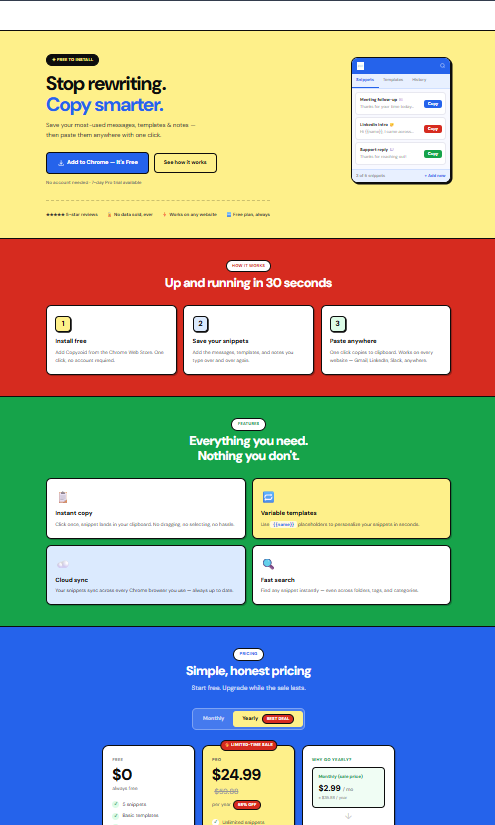
Ensure your manager has instant cloud sync. Whether you are on your desktop or your laptop, your snippets should follow you.
This is why we prioritize cloud sync in Copyzoid. Your workflow stays consistent, regardless of where you are sitting.

6. Over-Complicating the Setup
Productivity software often falls into the trap of "feature bloat."
Users get excited and try to use every single tagging system, color-code, and advanced setting available. Two weeks later, the system is so heavy that they stop using it entirely.
If it takes more effort to maintain the tool than the tool saves you, it's a net negative.
The Fix: Prioritize Simple Functionality.
The best system is the one you actually use.
Keep your setup minimalist and functional.
- One-click copy.
- Simple search.
- Fast access.
If you find yourself spending more than ten minutes a week "organizing" your snippets, you’re over-complicating it. The tool should serve you, not the other way around.
Check out our simple pricing to see how we keep things straightforward for teams of all sizes.
7. Relying on Visual Memory Instead of Search
Are you the person who remembers that a snippet is "about halfway down the list" and "near the blue icon"?
This is a dangerous game. As your library grows, your visual memory will fail you. You’ll find yourself scrolling up and down, looking for a template that you know is there, but you just can't see it.
The Fix: Use Fuzzy Search.
Stop scrolling. Start searching.
A "fuzzy search" allows you to type what you remember: even if it’s just a keyword: and the tool will find it for you instantly.
Combined with the Ctrl+B shortcut, fuzzy search turns your snippet manager into a digital extension of your brain. You don't need to remember where it is; you just need to know what it’s about.

Stop the Toggle Tax Today
The difference between a stressed professional and a productive one is often just the tools they use: and how they use them.
Mistakes like over-complicating your folders or ignoring keyboard shortcuts might only cost you 30 seconds at a time. But multiply that by 50 times a day, 5 days a week, and you’re losing hours of your life to basic administrative friction.
Copyzoid was built to eliminate this friction.
We focused on the things that actually matter:
- Simple Folders that don't require a manual to understand.
- Ctrl+B for instant, distraction-free access.
- One-click copy to get you moving faster.
- Variable templates to keep your outreach professional.
If you’re ready to stop the 47-tab hunt and start actually getting things done, it’s time to rethink how you manage your snippets.
Get started for free and see how much time you can save when you stop making these common mistakes. Your future, more-productive self will thank you. 🚀
Leave a Reply