
You are likely losing 4.2 hours every single week to repetitive typing.
If you work in sales, support, or outreach, you spend a massive chunk of your day copying and pasting the same "About Us" paragraph or "Let's hop on a call" link. It’s tedious. It’s draining. And most importantly, it’s keeping you from actually closing deals.
When you use a snippet manager, you don't just save time; you regain your focus.
Outreach is a numbers game, but it's also a consistency game. If your outreach templates are scattered across sticky notes, Google Docs, and sent-folder drafts, your response rates will suffer.
Here are 5 actionable tips to master your snippet management and win back your workweek.
1. Use Descriptive Naming Conventions for Speed
The biggest mistake people make with a snippet manager is naming things poorly.
If you have ten snippets named "Intro 1," "Intro 2," and "Intro 3," you will spend more time clicking through them than you would have spent just typing the email from scratch.
You need a naming system that works with fuzzy search. When you hit Ctrl+B to pull up your list, you should be able to type two letters and know exactly which template is appearing.
Try this structure:
- [Platform] – [Goal] – [Variation]
- Example: LI – Request – Personal
- Example: Email – Followup – No Response
By using clear, descriptive titles, you eliminate the cognitive load of "searching." You just find and go. This simple shift is the foundation of saving those 4.2 hours every week.
2. Add Variables for Personalization at Scale
Generic outreach is dead. If a prospect feels like they are reading a mass-produced template, they will hit "Delete" before they reach the second sentence.
However, you can’t afford to hand-write every single word for 50 prospects a day. The solution is using variables within your outreach templates.
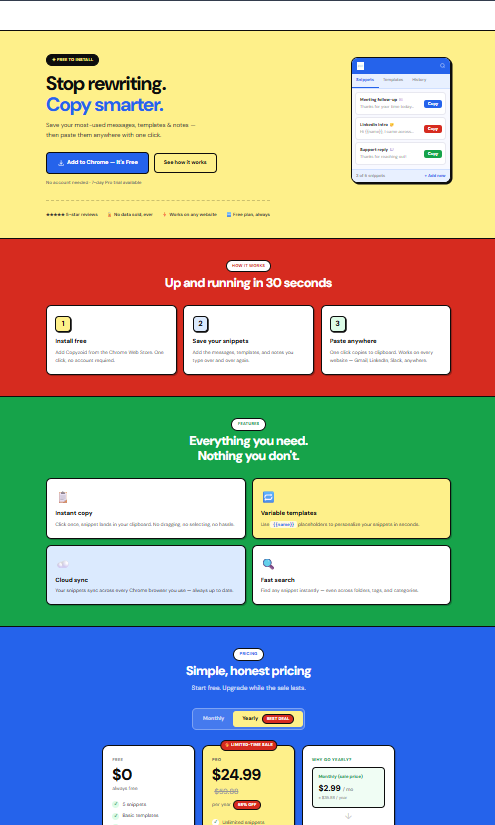
Instead of a static block of text, your snippets should have placeholders. A professional snippet manager allows you to see exactly where you need to "fill in the blanks" before you hit send.
Key variables to include:
- {{First_Name}}: The absolute bare minimum for any outreach.
- {{Company}}: Shows you’ve done at least a second of research.
- {{Trigger}}: The reason you are reaching out right now (e.g., "I saw your recent post about…").
Personalization increases response rates because it builds instant trust. By using variables, you keep the human touch without the manual labor.

3. Organize with Tags and Collections
As your library of outreach templates grows, a flat list becomes a mess. You need a way to categorize your snippets by the specific stage of the funnel or the specific persona you are targeting.
Organizing with tags allows you to pull up specific "kits" of information instantly.
For example, you might have a "Onboarding" tag for new clients and a "Cold Outreach" tag for prospects. When you are in "outreach mode," you only want to see the snippets that matter for that task.
Why organization matters:
- Reduces Clutter: You only see what you need, when you need it.
- Consistency: Every team member uses the same approved language.
- Scalability: Adding a new team member becomes easy when the "Best Practices" are already tagged and ready to go.
A clean snippet manager is a fast snippet manager. Don't let your productivity tool become another source of digital clutter.
4. Combine Snippets Strategically (The Modular Approach)
Stop trying to write one "perfect" long email snippet. Instead, think of your outreach as a set of building blocks.
The modular approach involves creating smaller, hyper-focused snippets that you can stack together. This allows you to "build" a custom email in seconds that feels completely unique to the recipient.
The 3-Block System:
- The Hook: A snippet for the opening line (e.g., a compliment on their recent funding round).
- The Value Prop: A snippet explaining how you solve a specific problem.
- The CTA: A snippet with your booking link or a specific question.
Using Copyzoid, you can use one-click copy to grab these blocks and assemble them in your email client. This modular style ensures your outreach templates never feel stale or "robotic" because you are constantly mixing and matching the components. 📝

5. Keep Content Simple and Value-Focused
The best snippets are the ones that get to the point. In the world of outreach, brevity is a superpower.
When you are creating your snippets, ask yourself: "Does this sentence provide value, or is it just fluff?"
If you are reaching out to a busy executive, they don't want to read a wall of text. They want to know why you are in their inbox and what is in it for them. Lead with the ROI or the efficiency gain.
Pro-tip for snippet writing:
- Use short, punchy sentences.
- Focus on one specific pain point per snippet.
- Include a clear, low-friction Call to Action (CTA).
A snippet manager like Copyzoid helps you maintain this quality. When you find a version of a message that works, you save it, sync it to the cloud, and ensure you never have to "wing it" again.
Why Speed is Your Best Sales Tool
In outreach, speed to lead is everything. If a prospect interacts with your content or asks a question, the faster you respond, the higher the chance of conversion.
If you have to go digging through your "Sent" folder to find that one great explanation you wrote last Tuesday, the lead is already getting cold.
With a browser extension, your entire knowledge base is available at your fingertips. By hitting Ctrl+B, you can respond to a complex inquiry in five seconds instead of five minutes.
That difference: multiplied over a week: is exactly how you save those 4.2 hours.

Take Control of Your Productivity
The goal of using a snippet manager isn't just to work faster; it's to work smarter.
By automating the repetitive parts of your communication, you free up mental energy for the things that actually matter: like building relationships and solving problems for your customers.
Summary of Action Steps:
- Install a tool like the Copyzoid Chrome Extension.
- Audit your sent folder and identify the 5 things you type most often.
- Turn those into snippets with clear naming conventions.
- Add variables to ensure they stay personal.
- Use Ctrl+B religiously to build the habit of speed. 🔁
Efficiency doesn't have to be complicated. It just requires the right tools and a simple system.
If you’re ready to stop wasting time and start scaling your outreach, check out our pricing page to see how Copyzoid can fit into your workflow.
For more information on how we handle your data while you boost your productivity, feel free to review our Privacy Policy and Terms of Service.
Leave a Reply